
Your Google People Card is your free virtual visiting card inside Google Search. When someone searches your name, a well-built card can show your photo, your role, your website, and your social links right at the top of the results. But a card is only as useful as the information on it, and details change. This guide walks you through editing an existing People Card on mobile, updating each field, hiding sensitive contact details, and fixing the most common reasons a card fails to appear.
What Is a Google People Card?
A People Card is a personal profile that Google lets individuals create so they can be found in Search. It is designed for professionals, freelancers, creators, and business owners who want a simple public presence without building a full website. The feature is available in select regions, including India, and it works on mobile devices in the Google app or a mobile browser.
How to Edit Your People Card in Four Steps
Editing assumes you already created a card. If you have one, the process is quick:
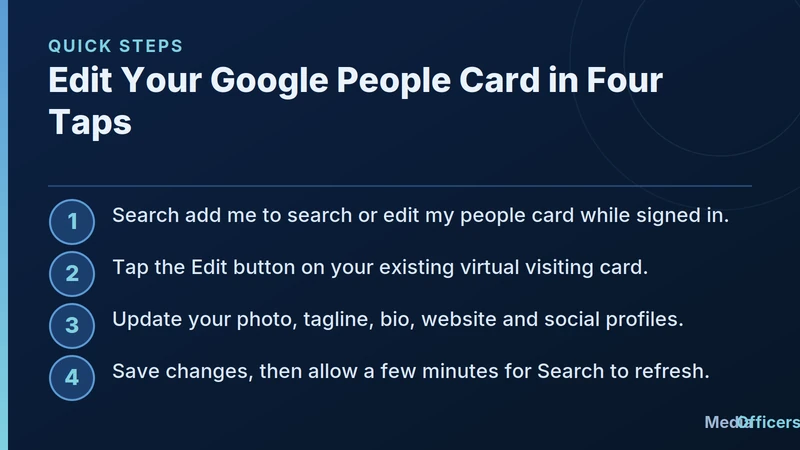
Infographic 1: Four-Step Mobile Workflow for Editing Your Google People Card
- Sign in to the Google account that owns the card, then open the Google app or a mobile browser.
- Search for edit my people card or simply search your own name. Your card appears at the top.
- Tap the Edit button on the card to open the editable form.
- Change any field you like, then tap Save. Allow a few minutes for Search to refresh the public version.
Which Fields You Can Customize
- Profile photo: Upload a clear, friendly headshot that builds trust.
- Name and tagline: State your exact role (e.g. SEO consultant or freelance photographer).
- About or bio: Write 2 - 3 natural sentences describing what you do.
- Website and social links: Add your portfolio and active social media channels.
- Contact details: Optional phone and email fields for public display.
How to Hide Sensitive Details
A People Card is public by design. If you do not want your phone number or email exposed, simply leave those fields blank before saving. For most professionals, pointing visitors to a contact form on a personal website is safer than publishing a personal cell phone number on a public search card.
Fix Common People Card Problems
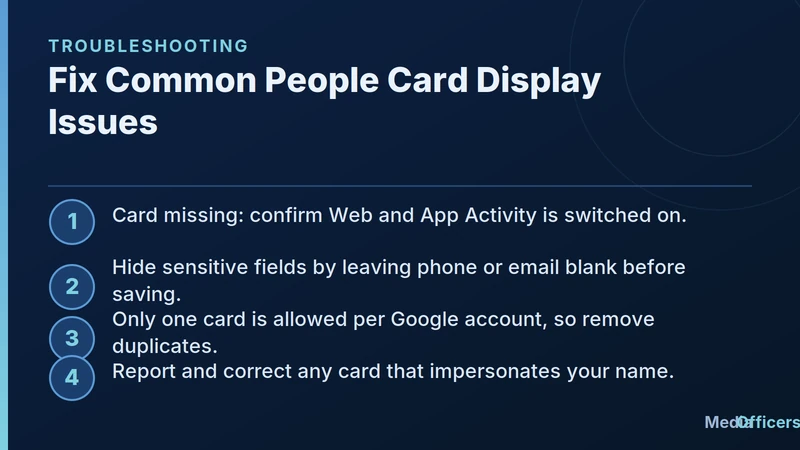
Infographic 2: Troubleshooting Fixes for Google People Card Search Visibility
- Card not showing in Search: Ensure Web and App Activity is enabled in your Google account settings.
- Cannot find edit button: Confirm you are searching on a mobile device while signed into the creator account.
- Duplicate cards: Delete any extra card so only one verified profile exists.
Frequently Asked Questions
Is editing a People Card free?
Yes. Creating and editing a People Card is completely free with a personal Google account.
How long until my edits appear in Search?
Edits usually reflect within a few minutes, though full cache updates across all search nodes may take up to an hour.
Conclusion & Next Steps
Your Google People Card is a fast, free way to control how you appear in Google Search. Keep your photo current, write a human bio, share only comfortable contact details, and check your card periodically to keep your search presence sharp.
Key Strategic Takeaways & Implementation Framework (2026 Update)
To achieve peak competitive performance in Edit My People Card: Easy Step-by-Step Customization Guide (2026), businesses must adopt a structured, data-driven methodology. Implementing effective workflows requires continuous monitoring, technical auditing, and strategic alignment with audience search intent.
- Intent Alignment: Ensure every digital asset directly satisfies the user's primary query with zero transactional friction.
- Technical Health: Maintain fast server response times, responsive mobile rendering, and clean schema markup graphs.
- Performance Analytics: Track organic conversion metrics, keyword positioning trends, and user engagement signals continuously.
Frequently Asked Questions (FAQ)
What is the primary benefit of Edit My People Card: Easy Step-by-Step Customization Guide (2026)?
The main benefit is accelerating qualified organic reach, strengthening brand authority, and generating consistent high-margin leads or sales through search engines and digital channels.
How long does it take to see measurable results?
Initial indexing and visibility improvements typically manifest within 2 to 4 weeks, with compounding organic revenue and traffic growth materializing over 3 to 6 months.
Final Expert Recommendations
Success in modern digital marketing depends on consistency, technical execution, and authority building. Partner with MediaOfficers to audit your digital infrastructure, optimize your multi-channel strategy, and outpace market competitors in 2026.
Turn Organic Search Visibility Into Qualified Revenue
Need an engineering-led team to audit your technical blockers, build sustainable topical authority, and scale your commercial rankings? Partner with MediaOfficers.

Written by
Rudhrah KeshavCo-Founder & Chief Revenue Officer (CRO)
Rudhrah Keshav is the Co-Founder & CRO at MediaOfficers. 16+ years SEO architect, published author of "AI Marketing for Indian Businesses" and "Local SEO" (Google Books / Amazon), featured in Yahoo Finance.


