Address: Mediaofficers, Preet Colony, Near Baweja Nursing Home, Rupnagar, Punjab 140001
Phone: +919501504089
Phone: +918968951854
Email: hello@mediaofficers.com


SEO isn’t dead – it’s evolving. While some marketers worry that AI search engines will make traditional optimization obsolete, the truth is more nuanced. Google still processes over 8.5 billion searches daily, and most of those users are looking for answers, solutions, and products just like yours.
The biggest mistake beginners make? Thinking SEO is just about stuffing keywords into content and hoping for the best. Modern SEO requires understanding user intent, creating genuinely helpful content, and optimizing for both traditional search engines and AI assistants like ChatGPT, Perplexity, and Google’s AI Overviews.
This SEO Tips for Beginners‘s guide will walk you through everything you need to know about SEO as a beginner. You’ll learn how search engines work, discover the core types of SEO, and get 15 actionable tips you can implement immediately. By the end, you’ll have a clear roadmap to start ranking your website and attracting organic traffic.
What is SEO?
SEO (Search Engine Optimization) is the process of improving your website so it ranks higher in search engine results. When done right, it brings free, targeted traffic to your site without paying for ads.
Why is SEO important for beginners?
SEO stands for Search Engine Optimization. It’s the practice of optimizing your website and content to rank higher in search engine results pages (SERPs). When someone searches for information related to your business, good SEO helps ensure your website appears near the top of the results.
How search engines work
Search engines like Google use three main processes to deliver results:
SEO vs. paid ads
SEO focuses on earning organic (unpaid) rankings through optimization, while paid search advertising (like Google Ads) involves paying for placement. SEO takes longer to show results but provides sustainable, long-term traffic. Paid ads deliver immediate visibility but stop working the moment you stop paying.
SEO has transformed significantly with the rise of AI-powered search experiences. Understanding these changes is crucial for beginners.
Traditional SEO vs. AI SEO
Traditional SEO focused primarily on ranking in Google’s blue links. AI SEO considers how your content appears in AI-generated summaries, featured snippets, and conversational AI responses. Both matter, but the latter is becoming increasingly important.
Search Everywhere Optimization
Your content now needs to perform across multiple platforms: Google, Bing, ChatGPT, Perplexity, and social media search functions. This means creating clear, well-structured content that AI models can easily understand and cite.
The role of AI assistants
AI assistants extract information from trusted sources to answer user queries. To appear in these responses, your content needs to be authoritative, well-formatted, and directly answer specific questions.
User intent is everything
Search engines – both traditional and AI-powered – prioritize understanding what users actually want. Your content must match search intent, whether that’s informational (learning something), navigational (finding a specific site), transactional (making a purchase), or commercial (researching before buying).
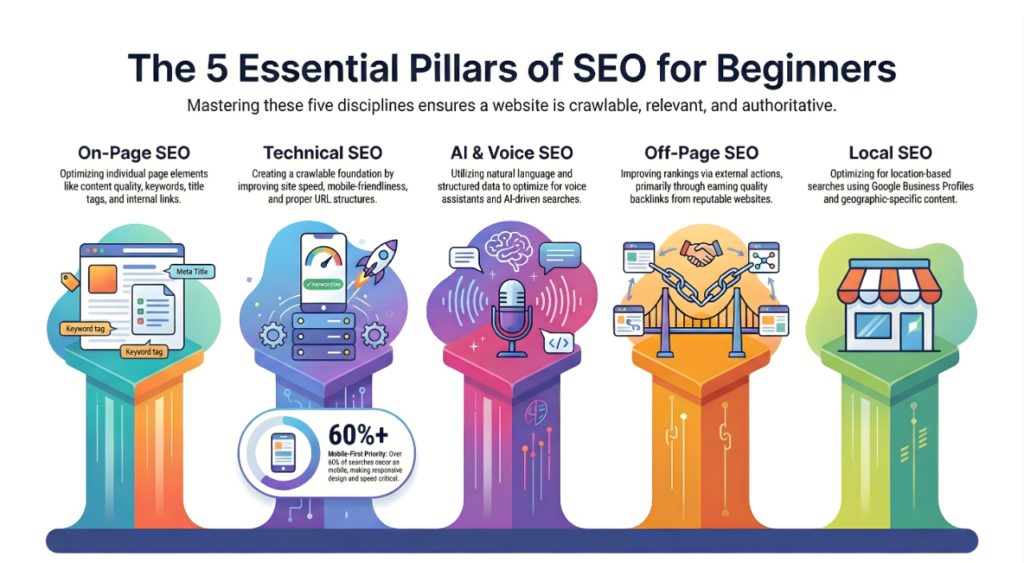
On-page SEO involves optimizing individual web pages to rank higher. This includes your content quality, keyword usage, title tags, headings, internal links, and meta descriptions. It’s the most direct form of SEO you can control.
Off-page SEO refers to actions taken outside your website to improve rankings. The most important factor is backlinks – links from other websites to yours. Quality backlinks signal to search engines that your content is valuable and trustworthy.
Technical SEO ensures search engines can crawl, index, and understand your website. This includes site speed, mobile-friendliness, proper URL structure, XML sitemaps, and fixing broken links. Think of it as the foundation that makes all other SEO efforts possible.
Local SEO optimizes your online presence for location-based searches. It’s essential for businesses serving specific geographic areas. Key elements include Google Business Profile optimization, local citations, and location-specific content.
This newer category focuses on optimizing for voice search and AI assistants. It involves using natural language, answering questions directly, implementing structured data, and creating conversational content that AI models can easily parse and cite.
| SEO Tip or Category | SEO Type | Core Objective | Key Action Items | Primary Benefit | Success Metric (Inferred) |
|---|---|---|---|---|---|
| Understand Search Intent | On-Page | Match content to user needs | Identify user goals (learn, buy, find), Match content format to intent, Select appropriate content angle | Improved ranking relevance and user satisfaction | Bounce Rate and Time on Page in Google Analytics |
| Proper Keyword Research | On-Page | Identify high-potential search terms | Use Google Keyword Planner, Use Ubersuggest, Use AnswerThePublic, Analyze search volume and competition | Data-driven content strategy | Organic Keyword Rankings in Search Console |
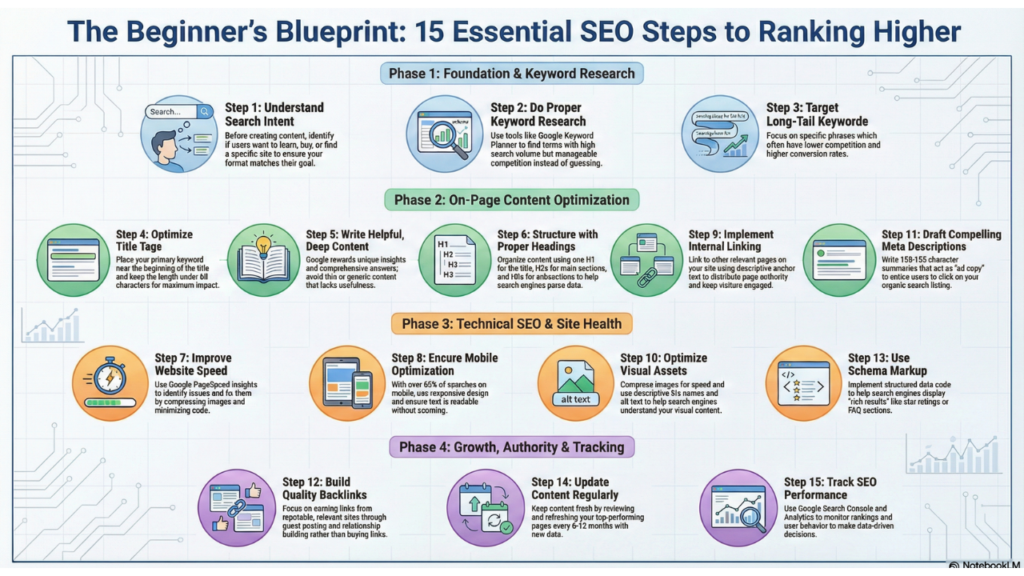
Before creating any content, identify what users actually want when they search for your target keyword. Are they looking to learn, buy, or find a specific website? Match your content format and angle to that intent. A product comparison post won’t rank for a “how to” query.
Find keywords that people actually search for using tools like Google Keyword Planner, Ubersuggest, or AnswerThePublic. Look for terms with decent search volume but manageable competition. Don’t just guess – base your content on real search data.
Long-tail keywords are longer, more specific phrases like “best running shoes for flat feet” rather than just “running shoes.” They typically have lower search volume but higher conversion rates and less competition, making them perfect for beginners.
Your title tag is the clickable headline in search results. Include your primary keyword near the beginning, keep it under 60 characters, and make it compelling enough that people want to click. A good title balances SEO and user appeal.
Google’s algorithm increasingly rewards content that genuinely helps users. Focus on comprehensively answering questions, solving problems, and providing unique insights. Thin, generic content won’t cut it anymore. Aim for depth and usefulness.
Use a clear hierarchy: one H1 (main title), multiple H2s (main sections), and H3s (subsections). Include keywords naturally in your headings. This structure helps both users and search engines understand your content organization.
Page speed directly impacts both rankings and user experience. Compress images, minimize code, use browser caching, and consider a content delivery network (CDN). Test your speed with Google PageSpeed Insights and address any issues it identifies.
Over 60% of searches happen on mobile devices. Your site must load quickly and display properly on smartphones and tablets. Use responsive design, ensure text is readable without zooming, and make buttons easy to tap.
Link to other relevant pages on your website within your content. This helps search engines discover your pages, establishes site structure, distributes page authority, and keeps visitors engaged longer. Use descriptive anchor text that indicates what the linked page is about.
Compress images to reduce file size without losing quality. Use descriptive file names (not IMG_1234.jpg) and add alt text that describes the image. This improves page speed and helps search engines understand your visual content.
While meta descriptions don’t directly impact rankings, they influence click-through rates. Write compelling 150-155 character summaries that include your keyword and entice users to click. Think of it as ad copy for your organic listing.
Focus on earning links from reputable, relevant websites through great content, guest posting, digital PR, and relationship building. Avoid buying links or participating in link schemes – quality matters far more than quantity.
Schema markup is code that helps search engines understand your content better. It can enable rich results like star ratings, FAQs, and how-to steps in search results. Start with basic schema types relevant to your content using Google’s Structured Data Markup Helper.
Search engines favor fresh, current content. Regularly update your existing pages with new information, statistics, and examples. Set a schedule to review and refresh your top-performing content every 6-12 months.
Use Google Search Console and Google Analytics to monitor your rankings, organic traffic, and user behavior. Track which keywords drive traffic, which pages perform best, and where visitors drop off. Data-driven decisions beat guesswork every time.
Google Search Console
Free tool that shows how Google sees your site. Monitor your rankings, identify indexing issues, discover which queries bring traffic, and receive alerts about technical problems. Essential for every website owner.
Google Analytics
Track visitor behavior, traffic sources, and conversion metrics. While not SEO-specific, it provides crucial insights about what happens after people find your site through search.
Keyword research tools
These tools help you discover search volume, competition levels, and keyword variations.
AI SEO tools
Free vs. Paid tools comparison
Free tools work well for beginners and small projects. They provide essential data without cost. Paid tools offer more comprehensive data, competitive analysis, and advanced features. Start free, upgrade when your SEO efforts justify the investment.
Keyword stuffing
Unnaturally cramming keywords into content makes it unreadable and can trigger penalties. Write naturally for humans first, optimize for search engines second.
Copying content
Duplicating content from other sites (or even your own pages) confuses search engines and can result in penalties. Always create original content or properly canonicalize duplicates.
Ignoring mobile users
A non-mobile-friendly site alienates the majority of users and suffers in rankings. Mobile optimization isn’t optional anymore.
Buying spam backlinks
Low-quality link schemes might offer quick results but risk severe penalties. One quality link beats dozens of spammy ones.
Publishing without intent
Creating content without understanding what searchers actually want wastes time and resources. Always match content to search intent.
Use this checklist for every piece of content you publish:
✅ Keyword research completed
✅ Search intent identified and matched
✅ Optimized title tag (under 60 characters)
✅ Proper heading structure (H1, H2, H3)
✅ Internal links to relevant pages
✅ Fast loading page (under 3 seconds)
✅ Image ALT tags added
✅ Meta description written
✅ Mobile-responsive design
✅ Schema markup implemented
✅ Content proofread and edited
✅ Performance tracking set up
Write clear, direct answers
AI models favor content that directly answers questions in the first few sentences. Lead with your answer, then provide supporting details.
Use structured formatting
Bullet points, numbered lists, tables, and clear headings help AI parse and extract information accurately. Structure makes your content more “quotable” for AI responses.
Add FAQ sections
Frequently Asked Questions sections are perfect for AI extraction. They provide question-answer pairs in an easily digestible format.
Build topical authority
Create comprehensive content clusters around specific topics rather than scattered individual posts. AI systems recognize and reward topical expertise.
EEAT optimization
Demonstrate Expertise, Experience, Authoritativeness, and Trustworthiness through author bios, credentials, citations, and original research. AI models prioritize content from trustworthy sources.
SEO is a long-term investment, not a quick fix. Setting realistic expectations prevents frustration.
Realistic expectations
Most websites see initial movement within 3-6 months, with significant results taking 6-12 months or longer. Competitive niches require more time and effort.
Timeline breakdown
Growth stages
Early growth feels slow. Once you build momentum, results compound. Consistent effort over time beats sporadic bursts of activity.
Yes. While technical SEO benefits from coding knowledge, most SEO tasks – keyword research, content creation, link building – require no programming skills. Many platforms like WordPress, Shopify, and Wix handle technical aspects automatically.
Organic SEO itself doesn’t cost money, but most people invest in tools, content creation, and sometimes professional help. You can start with free tools and your own effort, then scale investment as you see results.
Focus on one primary keyword and 2-5 related secondary keywords per article. Don’t force keywords unnaturally. Modern SEO is about topics and intent, not keyword density.
Consistency matters more than frequency. Publishing one quality post weekly beats seven mediocre posts. Start with a schedule you can maintain long-term, whether that’s weekly, biweekly, or monthly.
No. AI is changing how SEO works but not eliminating it. AI search engines still need to find, understand, and rank content. Good SEO ensures your content gets discovered and featured in AI responses.
SEO might seem overwhelming at first, but it’s fundamentally about creating valuable content that helps people and making it easy for search engines to find and understand. You don’t need to master everything immediately.
Start with the basics: understand your audience’s search intent, do proper keyword research, create genuinely helpful content, and optimize your technical foundation. Track your results, learn from what works, and continuously improve.
The businesses that succeed with SEO are those that commit to consistent, quality efforts over time. Your competitors might have a head start, but SEO rewards persistence and value creation. Every piece of optimized content you publish is an asset that can drive traffic for years.
Take action today. Pick one tip from this guide and implement it on your website. Then pick another. Small steps accumulate into significant results.


