
Bing AI writing refers to the generative AI writing tools integrated directly into Microsoft's software ecosystem. In practical terms, that includes the Compose feature inside the Microsoft Edge browser sidebar, as well as Microsoft Copilot embedded inside Word, Outlook, and the broader Microsoft 365 environment. Both tools empower marketers, founders, and content creators to generate structured first drafts, polish unrefined copy, brainstorm creative angles, and shift tone seamlessly - without launching a standalone app or subscribing to third-party AI platforms.
For over a decade, most digital marketers have routed every dollar of budget and every hour of SEO effort toward Google. However, in 2026, ignoring Microsoft's search ecosystem is a strategic mistake worth fixing immediately. Bing has solidified its position as the world's second-largest search engine, processing hundreds of millions of daily queries. More importantly, its native AI layer has quietly become one of the most capable, real-time writing assistants available. If you create content for a living, understanding how Bing AI writing operates - and where it fits into modern search strategy - is no longer optional.
In this comprehensive 2026 guide, we break down what Bing AI writing actually does, the latest market data proving why it matters, step-by-step techniques to improve your prompt output, and essential fact-checking guardrails for brand safety.
What Is Bing AI Writing?
There is often confusion around terminology because Microsoft updated its branding over the past few years. Bing Chat was officially rebranded to Microsoft Copilot. When search marketers discuss "Bing AI writing," they are typically referencing one of two primary user interfaces:
1. Compose in Microsoft Edge
By clicking the Copilot icon in the Microsoft Edge sidebar and navigating to the Compose tab, you gain access to a dedicated writing workspace. Here, you can specify your desired tone (professional, casual, enthusiastic, or informational), select a format (paragraph, email, blog post, or bulleted list), and set output length. You can either request a fresh draft from scratch or highlight existing web text to rewrite and condense it directly alongside your active tab.
2. Copilot inside Microsoft 365 (Word & Workspace)
Inside Microsoft Word and Microsoft 365, Copilot serves as an enterprise-grade AI writing partner. Powered by advanced OpenAI GPT models alongside Microsoft's proprietary in-house MAI models, Copilot can draft multi-page documents, summarize internal business reports, and reason across your organization's files while adhering to enterprise privacy protocols.
Note on Recent Updates: In mid-2026, Microsoft streamlined Edge browser controls by integrating standalone Copilot tools directly into the browser's context menus, address bar, and tab strip for faster workflow access.
What Bing AI Writing Can Actually Do
The feature set of Microsoft Copilot covers almost every day-to-day content creation task:
- Generate Complete Drafts: Provide a specific prompt with target audience parameters, and Copilot returns structured first drafts for blog introductions, product announcements, email newsletters, and social media captions.
- Brainstorm & Expand Angles: Request long-tail keyword ideas, alternative headlines, or creative content angles when overcoming writer's block.
- Adapt Tone & Format: Effortlessly shift a technical whitepaper into a conversational LinkedIn post or transform bullet points into flowing prose.
- Refine, Rewrite & Shorten: Highlight wordy paragraphs and request a punchier, condensed edit - a massive time-saver during the editing phase.
- Accelerate SEO Research: Because the Edge version is grounded in real-time web search, you can research live competitor pages, draft optimized meta descriptions, and outline content briefs without leaving your active window.
The key takeaway is that Bing AI writing excels as an intelligent writing assistant, not an autonomous autopilot. It accelerates drafting and editing, but requires human expertise for fact-checking, strategic alignment, and brand voice.
Why Bing AI Writing & Bing SEO Matter in 2026
An AI writing tool is only as valuable as the audience reached by its underlying search engine. The 2026 search market data demonstrates why Bing deserves dedicated attention:
- Massive Active Scale: Bing processes approximately 900 million daily searches and averages over 3.3 billion monthly visits. Microsoft's active ecosystem officially surpassed 1 billion monthly active users, representing a massive market of searchers.
- High-Intent B2B Demographic: Bing users skew professional, desktop-heavy, and possess higher average disposable household income. For B2B services, SaaS products, and premium consumer brands, this audience is highly lucrative - and subject to far lower keyword competition than Google.
- Dominance of AI Search Answers: Industry research reveals that over 60% of adults regularly read AI-generated summary answers directly on search engine results pages (SERPs). If your website content is not structured to be indexed and cited by Microsoft Copilot, you risk becoming invisible at the exact moment buyers perform research.
- Cost-Effective Paid Campaigns: For paid search marketers, Microsoft Advertising costs per click (CPC) run significantly lower on average than Google Ads, delivering higher ROAS for allocated ad spend.
Together, these factors form the core of Generative Engine Optimization (GEO) - the discipline of optimizing content so that Bing search crawlers and Copilot AI models cite your brand as an authoritative source.
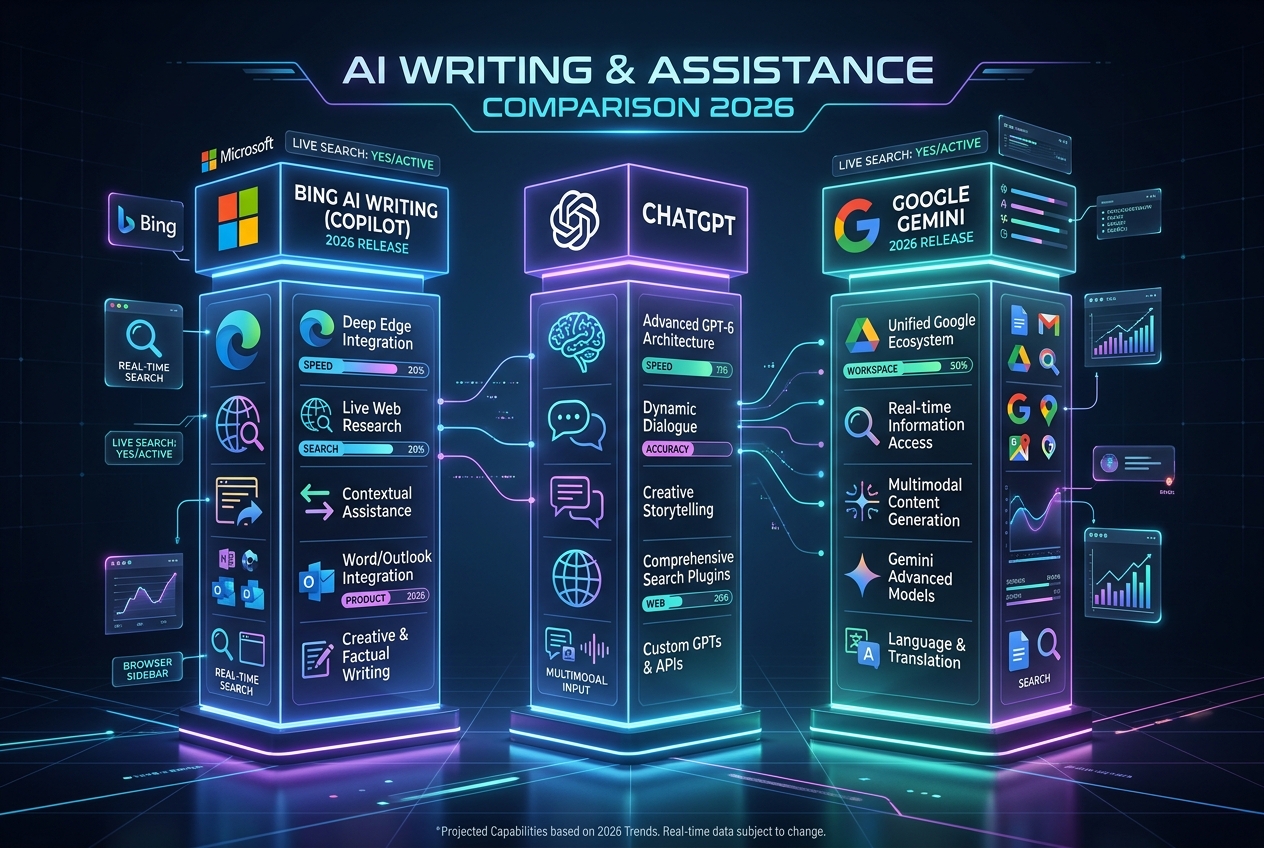
Figure 1: Feature comparison between Bing AI Writing (Copilot), ChatGPT, and Google Gemini.
How to Get Better Output From Bing AI Writing
To produce high-ranking content using Microsoft Copilot, avoid vague one-line prompts. Apply these proven prompt engineering principles:
1. Define Audience, Purpose, and Constraints
Generic prompts like "write an article about SEO" force the AI model to fill in missing details with generic averages. Instead, provide explicit parameters: "Write a 150-word intro for B2B marketing directors explaining why technical site audits improve lead conversion rates, ending with a clear CTA to run a free audit." Setting clear boundaries reduces ambiguity and yields precise drafts.
2. Leverage Live Web Search Grounding
Use the Edge sidebar version when drafting content that relies on current statistics, industry news, or live competitor data. Live search grounding reduces hallucinations and ensures facts reflect up-to-date information.
3. Request Flowing Prose Explicitly
AI assistants frequently default to bulleted lists. If your publication requires narrative paragraphs, specify "write in full, flowing prose paragraphs rather than bullet points."
4. Refine Through Iteration
Treat your initial output as a starting foundation. Rather than regenerating from scratch, instruct Copilot to "make the opening paragraph punchier" or "add a real-world B2B example to section two." Iterative editing preserves strong elements while refining weak sections.
Generative Engine Optimization (GEO) Workflow for Bing Copilot
To ensure your published content gets cited inside Bing Copilot AI search answers, follow this 4-step GEO framework:
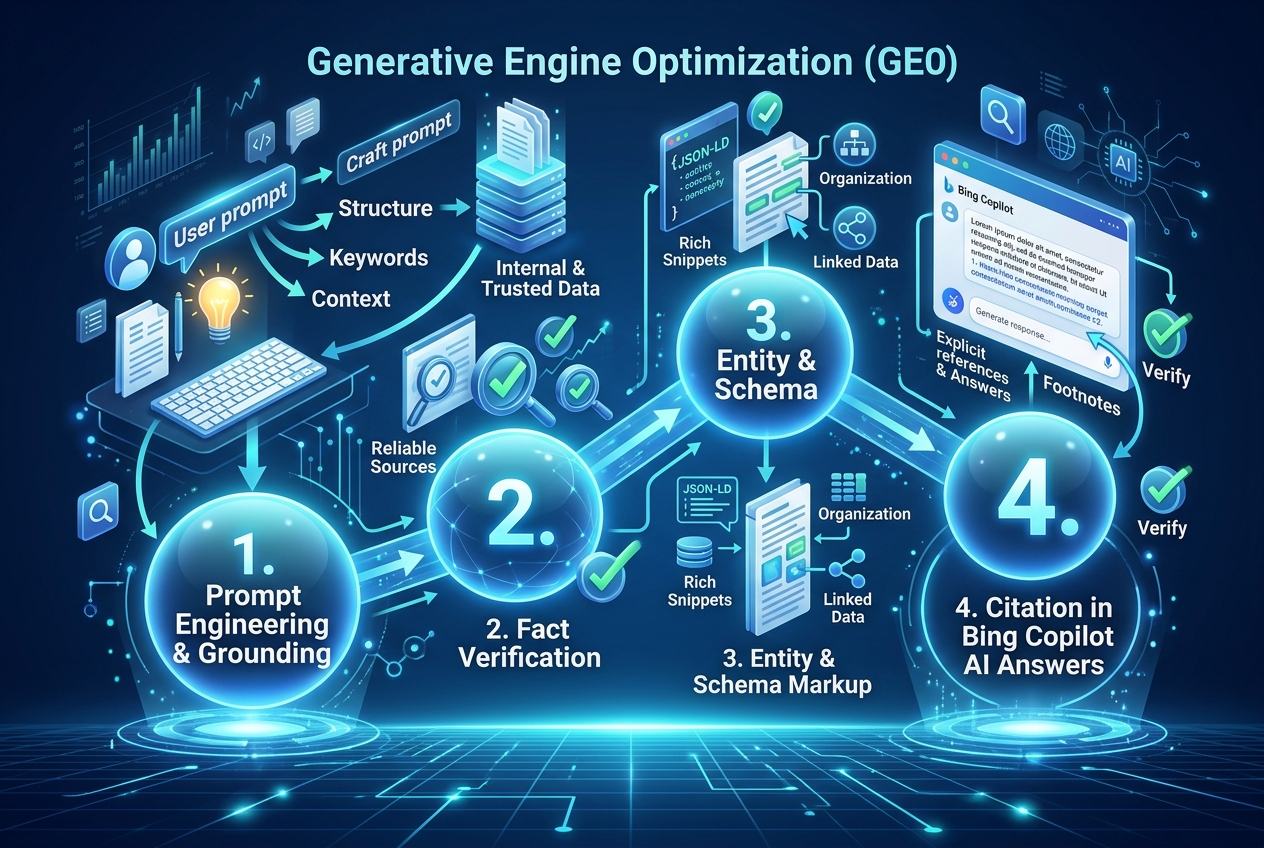
Figure 2: The 4-step Generative Engine Optimization (GEO) process to get cited in Bing Copilot.
- Structured Headings & Direct Answers: Use clear H2 and H3 headings paired with concise 40 - 60 word answer summaries directly below each question.
- Verifiable Statistics & Citation Sources: Include exact data points and cite authoritative primary sources. Copilot prioritizes content with high factual density.
- Structured Schema Markup: Implement valid JSON-LD Article & FAQ Schema so Bing crawlers can parse entity relationships.
- Technical Indexation via IndexNow: Instantly submit updated URLs to Bing via the IndexNow Protocol to ensure instant crawling.
Responsible Use: Fact-Checking, Copyright & Brand Safety
AI writing tools are powerful force multipliers, but maintaining brand trust requires strict human oversight:
- Verify Every Fact & Number: AI models can blend sources or generate plausible-sounding fictional numbers. Always double-check every statistic, quote, and date against primary sources before publishing.
- Understand Copyright Terms: While Microsoft offers a Customer Copyright Commitment for paid enterprise commercial Copilot accounts under specific conditions, free consumer tiers do not carry the same legal indemnification. Regardless of tier, brand owners are legally responsible for published content.
- Focus on Human Expertise (E-E-A-T): Search engines reward helpful, expert-led content. Use AI to draft and outline, then infuse your article with first-hand experience, original data, and unique brand perspective.
Bing AI Writing vs. ChatGPT vs. Google Gemini
Each major AI writing platform serves distinct workflow needs:
- Microsoft Copilot (Bing AI): Best for real-time web research inside Microsoft Edge, document drafting inside Microsoft 365 Word, and optimizing content for Bing SERPs.
- ChatGPT: Excellent standalone brainstorming workspace with advanced custom GPTs and direct OpenAI model access.
- Google Gemini: Ideal for teams heavily integrated into Google Workspace and Chrome.
For modern digital marketing agencies, these tools complement one another. The most effective approach is leveraging the writing assistant closest to your active workspace, while ensuring all published content is optimized to rank across Google, Bing, and AI search engines alike.
Frequently Asked Questions
Is Bing AI writing completely free to use?
Yes. The core tools - including Compose inside Microsoft Edge and Copilot on Bing.com - are completely free with a standard Microsoft account. Advanced features, unlimited document lengths, and deep Microsoft 365 integration require a commercial Copilot subscription.
Does AI-assisted content rank on Google and Bing?
Yes. Both Google and Bing reward high-quality, helpful, accurate, and user-centric content regardless of how it was drafted. However, search engines penalize low-quality, mass-produced AI text that lacks human editing, original insights, or verifiable data.
How do I make sure Bing Copilot cites my website in AI answers?
To earn citations in Bing Copilot, implement JSON-LD Schema, structure your headings logically with direct summary answers, maintain high domain authority via SEO Services, and submit fresh URLs via IndexNow.
About the Author: Written by Rudhrah Keshav, Co-Founder & CRO of MediaOfficers. I help founders, enterprise brands, and agencies scale organic visibility across Google, Bing, and AI search engines through search intelligence, technical SEO, and Generative Engine Optimization (GEO). Explore our Free SEOTools Hub or consult our Professional SEO Team to transform your search strategy.

Written by
Rudhrah KeshavCo-Founder & Chief Revenue Officer (CRO)
Rudhrah Keshav is the Co-Founder & CRO at MediaOfficers. 16+ years SEO architect, published author of "AI Marketing for Indian Businesses" and "Local SEO" (Google Books / Amazon), featured in Yahoo Finance.


