
In the first article of this series we covered why Bing deserves a place in your SEO strategy: 100 million+ daily active users, 10%+ of desktop search, and a direct pipeline into Copilot and ChatGPT answers. Today we do the single highest-leverage task in Bing SEO: setting up Bing Webmaster Tools (BWT). It takes less time than brewing a coffee, and everything else in this series builds on it.
Many marketers call it the “Bing Search Console,” and that is exactly the right mental model - it is Bing's control room for your site, with several tools Google does not offer, including free keyword research from real Bing query data, an on-demand Site Scan auditor, and the new AI Performance report that tracks how often Copilot cites your pages.
Key Takeaways
- Bing Webmaster Tools is 100% free, including tools that cost money elsewhere: keyword research, site audits, and backlink analysis.
- If your site is already verified in Google Search Console, the one-click import verifies it in Bing instantly - no files, tags, or DNS edits.
- Four verification methods are available: GSC import, XML file upload, HTML meta tag, and DNS CNAME record.
- Submit your sitemap immediately after verification - Bing leans on sitemaps more heavily than Google does.
- Reports populate within about 48 hours; historical data builds from the day you verify, so set it up now even if you won't use it for months.
Step-by-Step: Setting Up Bing Webmaster Tools
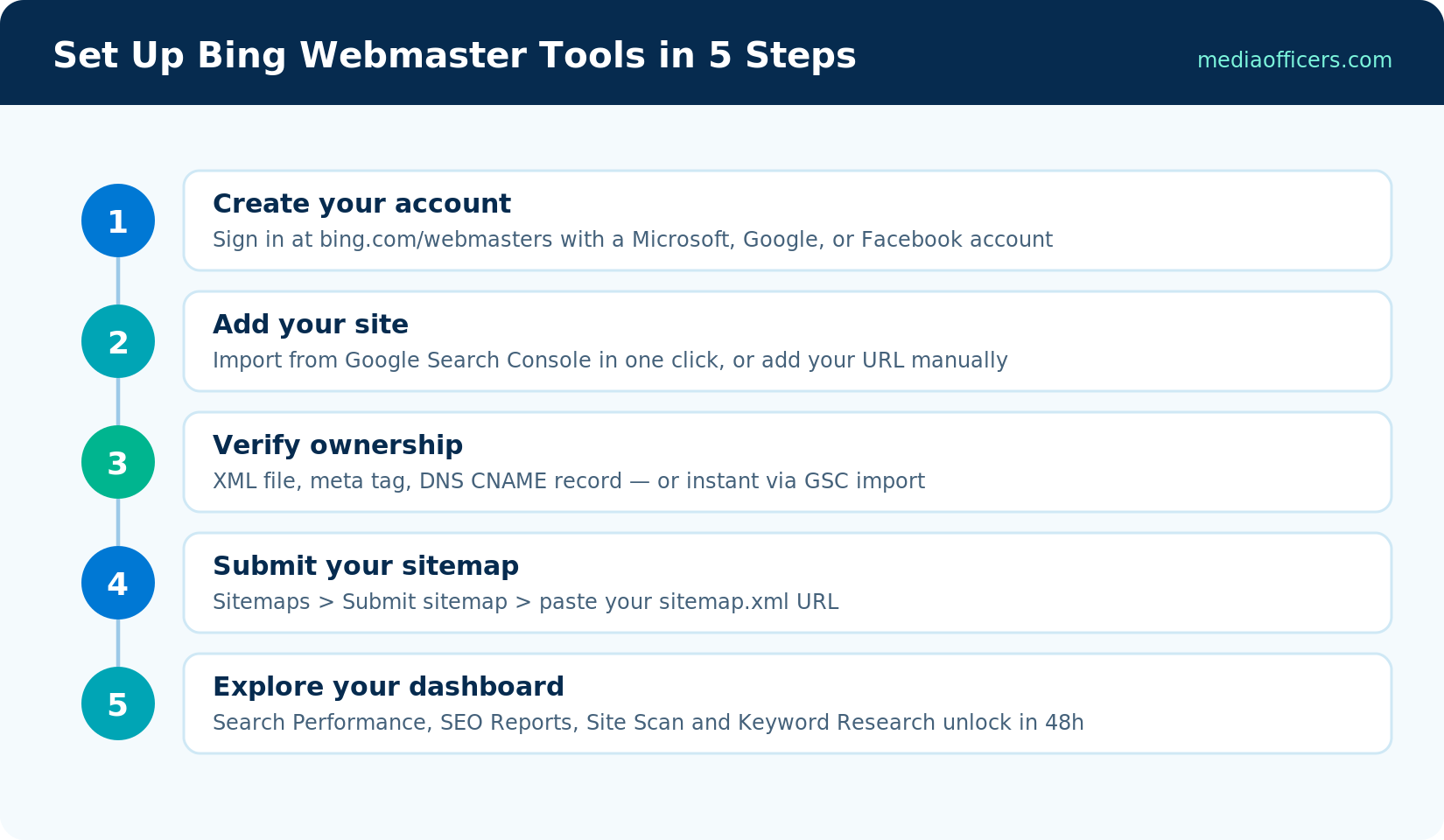
The complete Bing Webmaster Tools setup flow
Step 1: Create your account
Go to bing.com/webmasters and click Sign In. You can authenticate with a Microsoft, Google, or Facebook account. If your business already uses Microsoft 365, use that account - it keeps BWT alongside your other Microsoft admin tools and makes team access simpler later.
Step 2: Add your site (the smart way)
On first login, BWT presents two options: import from Google Search Console, or add your site manually. If you have GSC - and if you run any website, you should - choose Import. BWT reads your list of verified GSC properties, lets you tick the ones you want, and imports them along with sitemaps you have already submitted to Google. Because Google has already verified you own the site, Bing accepts that verification. This is the fastest route by far.
Step 3: Verify ownership (manual route)
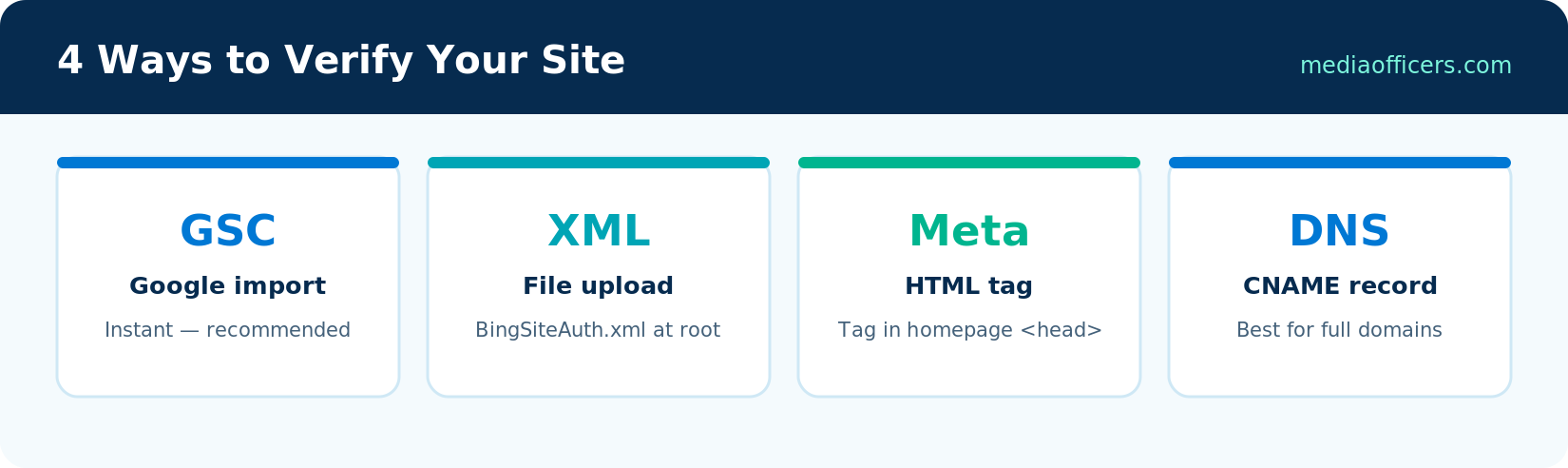
All four Bing site verification methods compared
Adding your site manually? Bing offers three verification methods. Pick one:
- XML file (BingSiteAuth.xml). Download the file BWT generates and upload it to your site's root directory so it is reachable at yoursite.com/BingSiteAuth.xml. Best when you have FTP or file-manager access.
- HTML meta tag. Copy the <meta name="msvalidate.01" ...> tag into the <head> of your homepage. WordPress users can paste it via their SEO plugin (Yoast, Rank Math, and AIOSEO all have a dedicated Bing verification field) - no code editing required.
- DNS CNAME record. Add the CNAME record Bing provides at your domain registrar. This verifies the entire domain including subdomains, and survives site redesigns - the most durable option for long-term ownership.
Click Verify once done. If verification fails, wait a few minutes (DNS changes can take up to 48 hours to propagate) and try again.
Step 4: Submit your sitemap
In the left menu, open Sitemaps and click Submit sitemap. Paste your full sitemap URL - typically yoursite.com/sitemap.xml or sitemap_index.xml. This matters more on Bing than on Google: Bing's own webmaster guidelines emphasize sitemaps as a primary discovery mechanism, and sites without one get crawled noticeably less thoroughly. In the next article we go further and set up IndexNow, which pushes changes to Bing in real time instead of waiting for a crawl.
Step 5: Explore the dashboard
Your dashboard summarizes clicks, impressions, average CTR, and indexed pages. Expect empty charts for the first day or two - Bing needs about 48 hours to begin populating data. While you wait, look around the left menu: Search Performance (your traffic analytics), URL Inspection (per-page index diagnostics), SEO Reports (site-wide on-page audit), Site Scan (on-demand technical crawl), Keyword Research (real Bing query data), and the AI Performance report showing Copilot citations. Articles 4, 7, and 10 of this series cover each of these in depth.
What You Get That Google Doesn't Give You
It is worth pausing on how generous this toolset is. Google Search Console is excellent but deliberately limited: no keyword research, no on-demand crawls, capped data exports. Bing Webmaster Tools includes a keyword research tool with exact search volumes (not bucketed ranges), a configurable Site Scan crawler that audits up to 10,000 pages, backlink data including your competitors' backlink profiles, and up to 16 months of search performance history. For a small business, BWT quietly replaces two or three paid SEO tool subscriptions.
Common Setup Problems (and Fixes)
- Verification keeps failing. Check the exact file location (root, not a subfolder), confirm the meta tag is in the <head> and not the <body>, or wait out DNS propagation. Caching plugins can also hide a freshly added meta tag - purge your cache.
- GSC import shows no sites. You signed into BWT with a different account than the one that owns your GSC properties. Sign out and use the matching Google account.
- Sitemap shows 'Couldn't fetch'. Verify the sitemap URL loads in a browser and your robots.txt doesn't block Bingbot. Bing's crawler respects robots.txt strictly.
- No data after a week. Confirm the site is actually indexed: search site:yoursite.com on Bing. If nothing appears, jump to Fixing Bing Indexing Issues guide of this series on fixing indexing issues.
Five-Minute First Wins
While your main reports populate over the first 48 hours, three things are worth doing immediately. Run a Site Scan on your homepage and top section - it works right away and often surfaces quick fixes like missing meta descriptions before any traffic data exists. Open URL Inspection on your five most important pages to confirm each is indexed; discovering a money page missing from Bing's index on day one is exactly the kind of problem you want found early. And check Crawl Control: some hosts historically throttled Bingbot by default, and raising a conservative limit takes ten seconds. These three checks convert setup day from pure waiting into your first optimization pass.
Frequently Asked Questions
Is Bing Webmaster Tools free?
Yes, completely - including keyword research, Site Scan audits, backlink analysis, and the AI Performance report. There is no premium tier.
Do I need Bing Webmaster Tools if I have Google Search Console?
Yes. GSC only reports on Google. BWT covers Bing, Yahoo, DuckDuckGo's Bing-sourced results, and Copilot/ChatGPT citations - plus tools GSC lacks entirely. Since you can import from GSC in one click, there is no reason not to.
How long does Bing verification take?
GSC import is instant. XML file and meta tag verification complete in seconds once the file or tag is live. DNS verification can take minutes to 48 hours depending on propagation.
Does verifying with Bing affect my Google rankings?
No. Verification is invisible to users and to other search engines. It simply proves ownership so Bing will share data with you.
Can I add multiple sites or team members?
Yes. BWT supports unlimited sites per account, and Role Management lets you grant read-only or full access to colleagues without sharing your login.
What's Next in the Series
Your site is verified and your sitemap is in. In Bing Sitemaps & IndexNow guide, we make Bing index your content in minutes instead of weeks: XML sitemap best practices plus a full IndexNow setup, including the WordPress plugins that automate it entirely.
For keyword volume research specifically tailored to Bing search traffic, explore our complete guide on Bing Keyword Research: Free Tool With Exact Volumes.

Written by
Rudhrah KeshavCo-Founder & Chief Revenue Officer (CRO)
Rudhrah Keshav is the Co-Founder & CRO at MediaOfficers. 16+ years SEO architect, published author of "AI Marketing for Indian Businesses" and "Local SEO" (Google Books / Amazon), featured in Yahoo Finance.


